


Flowkey vs Simply Piano: which app suits you?
- Dan Piano Studio
- Jul 27
- 9 min read

For most adults, Flowkey is the stronger choice. For children and absolute beginners who need gamified structure to stay motivated, Simply Piano works better. Neither replaces a teacher, but both can sharpen your practice between lessons.
Here is the short version before the detail:
Flowkey suits adult self-directed learners who want to read notation, grow a varied repertoire, and progress beyond beginner level. Its library of a large number of songs across a wide range of genres, combined with video of real pianists’ hands and multiple difficulty arrangements, gives it a longer runway than Simply Piano.
Simply Piano suits children aged 7–12 and absolute beginners who respond to badges, progress bars, and a tightly guided curriculum. Its gamified structure creates strong early engagement, though users commonly hit a progression ceiling within one to two years.
Neither app can correct your posture, fix a collapsed wrist, or teach genuine musical expression. If you are preparing for ABRSM or Trinity exams, or you want to develop real technique, book lessons at Danpianostudio alongside whichever app you choose.
Try the free trials first. If you are unsure after a week, a single lesson with a teacher will tell you more than a month of solo app use.
Table of Contents
How do Flowkey and Simply Piano actually compare?
Dimension | Flowkey | Simply Piano |
Best for | Adults, returning players, notation learners | Children, absolute beginners |
Teaching approach | Song-led with notation, video tutorials, free-roaming | Linear, gamified curriculum |
Song library | large library, wide range of genres | Smaller library, classical and pop focus |
Feedback type | Microphone or MIDI (USB/Bluetooth) | Microphone only |
Progression potential | Beginner through advanced arrangements | Beginner to lower intermediate |
Platforms | iOS, Android, web (Chrome) | iOS, Android only |
UK pricing | ~$19.99/month or ~$119.88/year; 7-day free trial | ~$14.99/month or ~$149.99/year; 14-day free trial |
Flowkey: strengths and weaknesses
Large, genre-diverse library with beginner, intermediate, advanced, and pro arrangements
Notation-focused lessons with overhead video of a pianist’s hands help adults build score-reading skills
Supports MIDI input for accurate note detection
Available on desktop via Chrome, useful for home practice setups
Arrangements are still adapted versions, not original scores
No pedal notation in score view
Analytics are basic; no hand-specific tracking
Simply Piano: strengths and weaknesses
Most beginner-friendly onboarding of the two apps
Gamification keeps children and novices motivated through early stages
14-day free trial gives more time to assess fit
No MIDI support, which limits feedback accuracy
Simplified arrangements can create a false sense of mastery
Mobile only; no desktop or web version
Pro Tip: Connect via USB or Bluetooth MIDI wherever possible. Microphone-based feedback is more forgiving and can miss wrong notes entirely in a lively acoustic environment; MIDI gives the app a direct signal and makes Wait Mode far more reliable.
How each app actually teaches you
The core difference is not the song libraries. It is the philosophy behind how each app moves you forward.
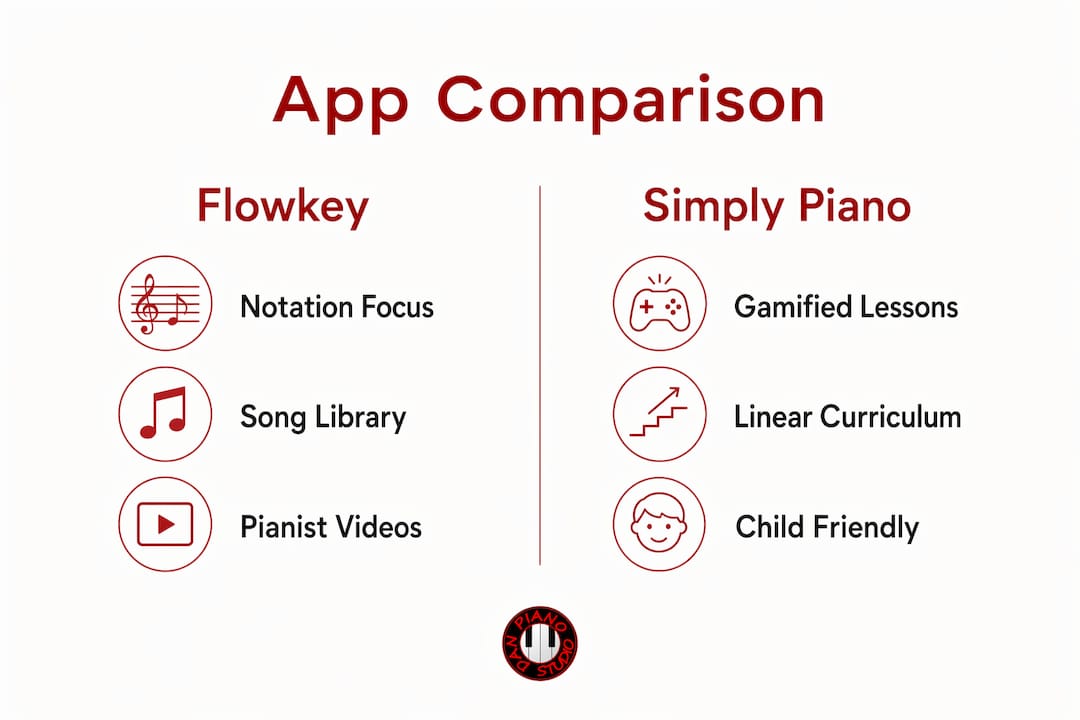
Flowkey is song-and-notation focused. You pick a piece, watch a pianist’s hands in the upper screen, follow an interactive score below, and use Wait Mode to pause playback until you hit the right note. The app lets you jump between pieces and difficulty levels freely, which suits adults who already have some musical context or who learn better by exploring than by following a fixed path.
Simply Piano is linear and gamified. It guides you through a set curriculum, unlocking the next lesson only when you complete the current one. Stars, streaks, and progress bars are built into every session. For a child who needs that external motivation, it works well. For an adult who finds the pace slow or the reward mechanics patronising, it can feel restrictive within a few weeks.
Two scenarios illustrate the gap. A parent setting up a ten-year-old with an iPad on a Saturday morning will find Simply Piano holds their child’s attention and keeps them moving through structured content without adult supervision. An adult returning to piano after a fifteen-year gap, who wants to work through a Ludovico Einaudi piece and actually read the score, will find Flowkey’s interface far more useful.
On input accuracy: microphone listening works in a quiet room, but it is genuinely unreliable in a typical home. MIDI connections improve accuracy significantly, and since Simply Piano does not support MIDI at all, its feedback is always microphone-dependent. That is a meaningful limitation for anyone using a digital piano or keyboard.
What neither app addresses: fingering efficiency, wrist alignment, dynamic shaping, or the kind of phrasing that makes a piece sound musical rather than mechanical. Apps are effective on-ramps for motivation and initial engagement, but they cannot see your hands.
Which app fits your situation?
Parent buying for a child aged 7–12: Start with Simply Piano’s 14-day trial. Pair it with a monthly lesson at Danpianostudio so a teacher can check hand position before habits set in.
Adult beginner with limited practice time: Try Flowkey. Its free-roaming structure lets you work on one piece at a time without committing to a rigid curriculum. Add a lesson every four to six weeks for technique checks.
Returning player aiming for ABRSM or Trinity exams: Neither app is sufficient alone. Use Flowkey for repertoire practice between lessons, but book regular sessions at Danpianostudio for sight-reading, scales, and exam technique. Adults can progress well with a structured plan.
Hobbyist who wants popular songs only: Flowkey’s library is the better fit. Simply Piano’s song selection skews towards classical and basic pop; Flowkey covers jazz, film scores, and contemporary pop in more depth.
The app-alone route is reasonable for the first two to three months, when motivation and basic note-reading are the main goals. Beyond that, it becomes a false economy. The time spent reinforcing a bad habit costs more to undo than a lesson would have cost to prevent it.
What apps will not teach you
This is the part most app marketing glosses over.
Posture and hand position: No camera, no correction. A collapsed wrist or raised shoulder can go unnoticed for months.
Fingering efficiency: Apps suggest fingering but cannot tell whether your chosen fingering is creating tension.
Nuanced dynamics and phrasing: Playing the right notes at the right time is not the same as playing musically.
Sight-reading fluency: Apps present simplified arrangements, not full scores. Moving to authentic sheet music later can feel like starting again.
Improvisation and advanced theory: Neither app teaches this in any meaningful depth.
A teacher can spot inefficient fingering and wrist alignment and prescribe targeted corrective exercises in a single session, something an app cannot reliably do after months of practice.
Pro Tip: Book a technique check with a teacher within your first month of app use, not after six months. Catching a postural problem early takes one session to fix; catching it late can take considerably longer.
Pricing, trials, and device support in the UK
Both apps are subscription services with free trials. Pricing is broadly similar and billed in US dollars internationally, with monthly and annual plans available along with free trials of about one to two weeks.
Device | Flowkey | Simply Piano |
iOS (iPhone/iPad) | ✅ | ✅ |
Android | ✅ | ✅ |
Desktop/web | ✅ (Chrome only) | ❌ |
MIDI input | ✅ USB or Bluetooth | ❌ |
Microphone input | ✅ | ✅ |
Pro Tip: Use your actual piano or keyboard during the free trial, not a phone speaker. The trial period is the right moment to test whether your setup works reliably with the app’s feedback system before you commit to a subscription.
Using an app alongside professional lessons
Apps work best as practice supplements, not replacements. Here is a practical weekly structure that works.
Lesson day: Your teacher assigns a specific piece or technical exercise. Note which section needs the most work.
App session one (day after lesson): Use the app to run through the assigned piece slowly, hands separately, at 50–75% speed.
App session two (mid-week): Increase speed, practise hands together, and use loop mode on the tricky bars.
Pre-lesson review: Play the piece through once without stopping. Note where you still hesitate.
Next lesson: Show your teacher the section you struggled with. Ask specifically: “Is my wrist position causing the tension here?” or “Which fingering would you use in bar eight?”
Questions worth bringing to every lesson after app practice:
“Is the fingering I’ve been using creating any tension?”
“My wrist drops on the left hand — is that visible?”
“The app says I’m playing correctly, but it doesn’t sound musical. What am I missing?”
For readers considering online lessons alongside app practice, this workflow translates directly to remote sessions.
Which should you choose?
If you are an adult who wants to read music and grow a real repertoire, choose Flowkey.
If you are buying for a child or an absolute beginner who needs gamified structure, choose Simply Piano.
If you are preparing for an exam, returning after a long break, or noticing technique problems, book lessons.
Three common scenarios:
Casual child learner: Start Simply Piano’s 14-day trial. After two weeks, book one lesson to check hand position. Continue the app with monthly teacher check-ins.
Adult aiming for ABRSM Grade 3 or above: Use Flowkey for daily repertoire practice. Book fortnightly lessons at Danpianostudio for technique, scales, and sight-reading. Reassess after three months.
Hobbyist who wants pop songs only: Flowkey is the clear pick. Run the 7-day trial, subscribe annually if the library suits you, and consider a lesson every couple of months to keep technique clean.
Why trust this comparison?
Danpianostudio teaches piano in Central London and online, working with children, adults, beginners, and advanced players across classical, jazz, and exam preparation. The studio’s teaching practice includes direct experience of how students use apps between lessons and where those apps help or hinder progress.
Sources used include practitioner reviews, independent app assessments, and commentary from piano educators. Pricing figures reflect published subscription rates and may vary; check each app’s website for current UK pricing before subscribing.
Lesson options and booking are available on the studio’s website.
For readers weighing private lesson benefits against app-only practice, the studio’s blog covers this in depth.
Key takeaways
Flowkey suits adults who want notation and repertoire growth; Simply Piano suits children and absolute beginners, but both hit a ceiling without a teacher.
Point | Details |
App choice by learner | Flowkey for adults and notation learners; Simply Piano for children and absolute beginners. |
Progression ceiling | Simply Piano users commonly plateau within one to two years; Flowkey’s advanced arrangements extend the runway. |
MIDI over microphone | MIDI input gives significantly more accurate feedback; Simply Piano offers microphone only. |
Apps cannot replace teachers | Posture, fingering, phrasing, and exam technique all require a real teacher to correct reliably. |
Danpianostudio | Offers in-person lessons in Central London and online sessions to complement app practice and build lasting technique. |
Apps are useful, but here is what they cannot show you
The conversation about Flowkey versus Simply Piano often misses the most important point: both apps are measuring whether you hit the right note at roughly the right time. That is a narrow definition of playing piano.
What a teacher sees in the first five minutes of a lesson, an app will never flag: the shoulder that creeps up during a difficult passage, the thumb that tucks under awkwardly and will cause problems at higher speeds, the student who plays every note at the same volume because the app rewarded accuracy but never asked for shape. These are not edge cases. They are the norm for self-taught learners, and they are exactly the problems that become expensive to fix later.
My view is that apps are genuinely useful for one thing above all else: keeping students practising on the days between lessons. That motivation function is real and worth paying for. But treating an app as a teacher is a category error. The two serve different purposes, and the students who progress fastest are the ones who understand that distinction early.
Danpianostudio: lessons that go where apps cannot
Apps build habit. Lessons build technique. If you are ready to move beyond what a screen can offer, Danpianostudio provides personalised piano lessons in Central London and online, covering everything from beginner foundations to ABRSM and Trinity exam preparation, jazz, classical, and improvisation.
Every lesson is tailored to the individual student. There are no rigid curricula, no gamified shortcuts, and no guesswork about whether your wrist position is correct. Whether you want to complement your Flowkey practice with monthly technique sessions or switch to full weekly lessons, the studio works around your schedule and goals.
Book a lesson online or in person, and find out what a teacher can show you in one session that an app has missed for months.
Recommended


Comments